Free & open sourceNo signup100% in your browser
Forge better OpenAPI specs.
Right here, in the dark.
OASForge is the dark OpenAPI workbench where better specs get forged: write YAML beside a live Swagger UI preview, validate with one-click fixes, exercise your API against a built-in mock server, import Postman collections and export documentation. No account, no backend — your spec never leaves the page.
swagger: "2.0"→openapi: 3.03.13.2 — every version, one editor
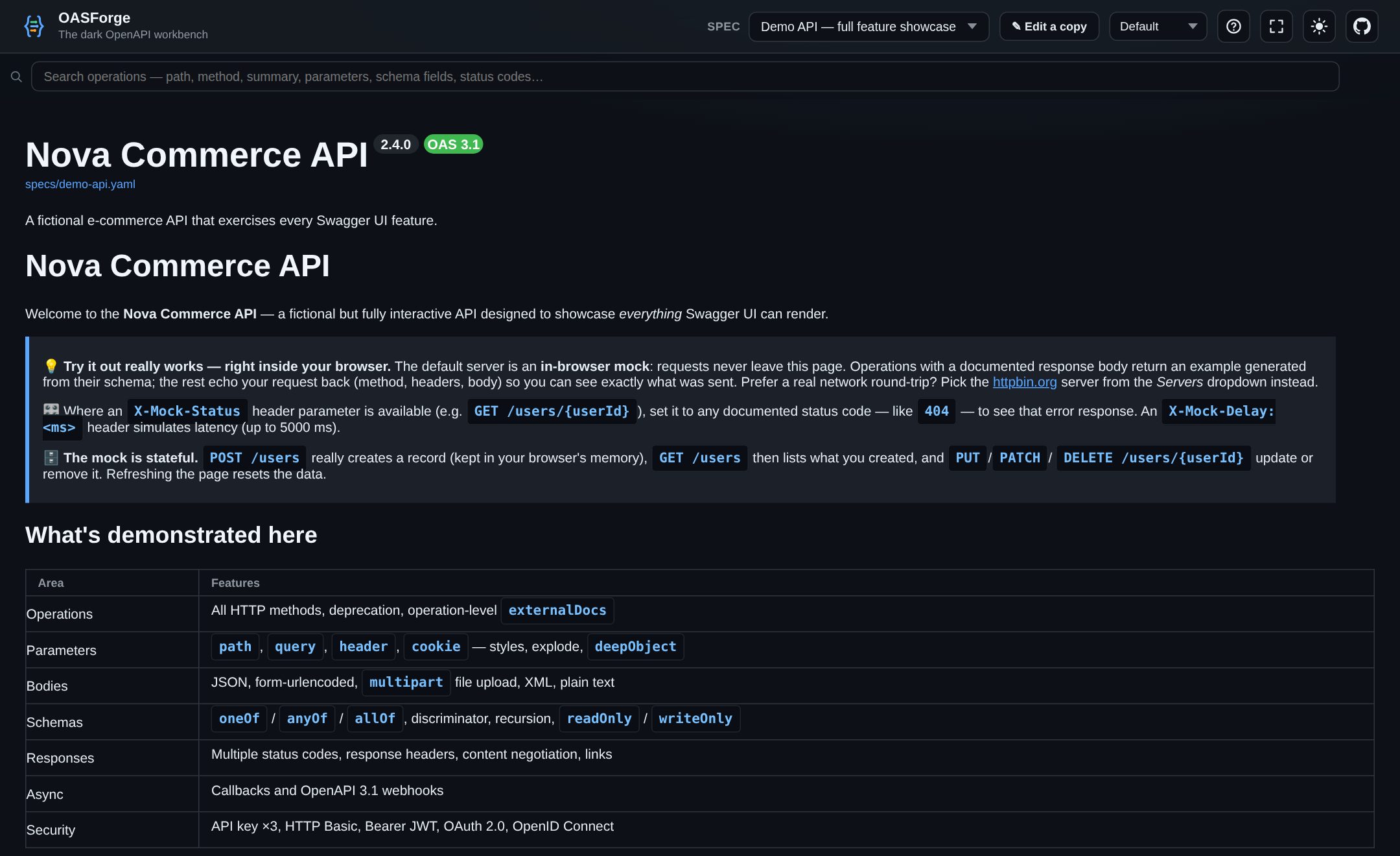
01An OpenAPI editor with everything a spec needs
Live preview
YAML on the left, rendered Swagger UI on the right — updated as you type, with the dark theme the ecosystem never shipped.
Version-aware validation
Errors and warnings tuned to Swagger 2.0, OpenAPI 3.0, 3.1 and 3.2 — clickable, explained, and most with a one-click Fix.
Stateful mock server
Try it out without a backend: POST creates records in the page, GET lists them back, schemas become realistic examples.
Insert menu
A CRUD resource, endpoint, parameter, response, schema or security scheme — inserted correctly indented, in the right section.
Context autocomplete
Only the keys valid at the cursor, plus live $ref targets and security-scheme names read from your own document.
Postman import
Drop a collection export and get clean OpenAPI 3: auth mapped, saved responses kept as named examples, noise headers removed.
Converters and exports
Swagger 2.0 → OpenAPI 3 in one click; export Postman collections, a guided JMeter rate-limit scenario or a self-contained HTML docs file.
Offline and private
No account, no backend — documents stay in your browser. Installable as a PWA, or a single HTML file that runs from disk.
02Your spec is nobody’s business
Most online editors quietly ship your API design to their servers. OASForge has no servers to ship it to: documents, history and settings live in your browser’s local storage, and the mock server answers requests inside the page. Paste the spec of an unreleased product with a clear conscience.
- No account, no telemetry, no upload — ever
- Works fully offline as an installable PWA
- One HTML file runs from a double-click, no web server
- Open source under the Elastic License 2.0
03From blank page to documented API
- Bring a document in. Start from the template, paste YAML or JSON, open a file, fetch a URL, or drop a Postman collection — Swagger 2.0 gets a one-click upgrade to OpenAPI 3.
- Shape it fast. The insert menu writes correct structure, autocomplete offers only valid keys, and the validator explains every issue with a fix attached.
- Try it and ship it. Exercise the API against the in-page mock server, then export a Postman collection, a JMeter spike or rate-limit test, standalone HTML docs, or a share link.
04Dig deeper
- Online OpenAPI editor →The writing experience: insert menu, autocomplete, inline rules and search.
- OpenAPI validator →What the linter catches and how quick fixes repair a document.
- In-browser mock server →Stateful Try-it-out with forced status codes and simulated latency.
- Postman to OpenAPI →How collections become clean OpenAPI 3 — auth, examples, headers.
- Swagger Editor alternative →An honest side-by-side with the original editor.
- User guide →The complete reference manual, section by section.
- FAQ →Privacy, versions, offline use and licensing, answered.
05Questions, answered
Is OASForge free?
Yes. The editor, validator, mock server, converters and exporters are all free to use, with no account and no usage limits. The source code is available on GitHub under the Elastic License 2.0.
Does my API spec leave my browser?
No. There is no backend: documents, version history and settings are stored in your browser’s local storage, and the mock server answers requests inside the page. The only network requests are ones you ask for, such as “Load URL” or the live Petstore view.
Which OpenAPI versions are supported?
Swagger 2.0 (with a one-click converter to OpenAPI 3), OpenAPI 3.0.x, 3.1.x and 3.2.x. Validation is version-aware: each document is checked against the keys and rules of its own declared version.
Can I use OASForge offline?
Yes, two ways. The site is an installable PWA that precaches itself and works fully offline after the first visit. There is also standalone.html — the entire app in one file that runs from a double-click, with no web server.
Ready when you are
No signup, no install — the editor runs entirely in your browser.
Start in the editor